
Share with the window closed
Close the window and your library stays shared, from a small icon in the menubar or the tray.
Phones, tablets and other computers keep reading your books while the window is closed. The icon sits in the menubar on a Mac and in the tray on Windows and Linux.
Switch to it
Section titled “Switch to it”The window has two ways in, and both do the same thing.
- Restart in headless mode is in the Preferences menu, under the gear button. It sits with the other restarts.
- Close and keep sharing is in the Connect/share menu, with the content server.
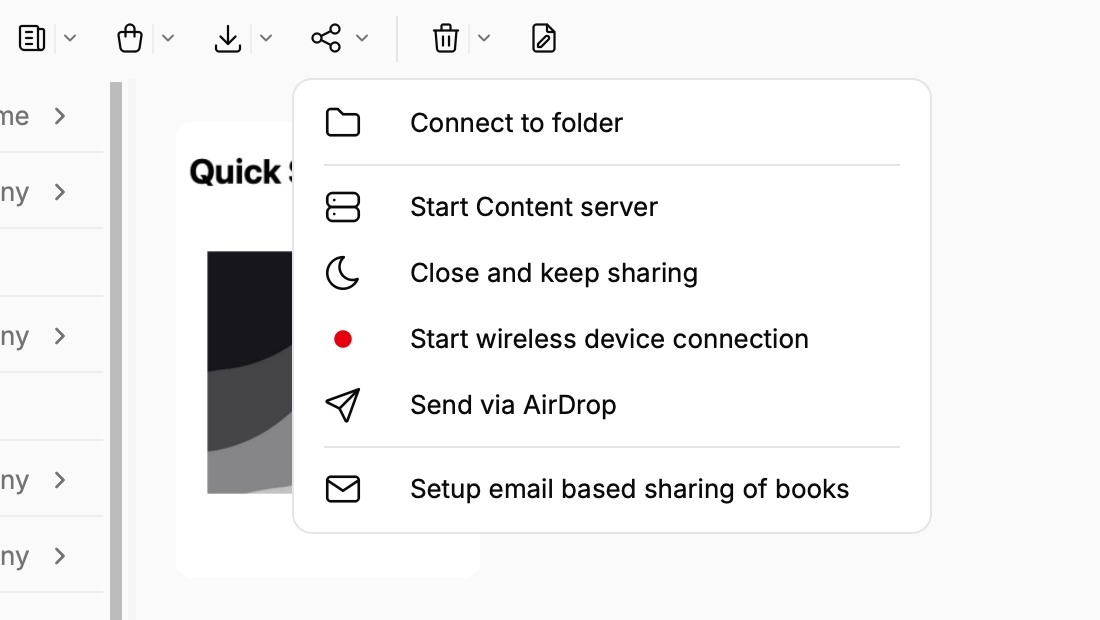
The window closes and the icon appears a moment later. A notice says your library is still shared.
The icon’s menu
Section titled “The icon’s menu”- Sharing at an address shows where to find your books. Open in browser and Copy address are just below it.
- Open Calibre Zen brings the window back. Opening the app from the Dock or Start menu works too. The icon steps aside while the window is open and takes over again when it closes.
- Share on this network lets phones and other computers in the house see your books. Without it, only this computer can.
- Allow changes from this computer lets the web page on this computer edit books without a login.
- Add books from a folder moves each book you drop in that folder into your library.
- Quit stops sharing.
Good to know
Section titled “Good to know”- The settings are the same ones as Preferences, Sharing over the net. A change in one shows in the other.
- It starts from the window for now. Starting it when you log in comes in a later version.
- Windows and Linux are newer ground. The icon works the same there, and a note on GitHub Issues or Reddit about how it went helps a lot.